> ## Documentation Index
> Fetch the complete documentation index at: https://docs.siliconflow.com/llms.txt
> Use this file to discover all available pages before exploring further.
# How to use Open Design with SiliconFlow APIs
> Use SiliconFlow as the built-in model provider in Open Design — the open-source, agent-native design workspace — to generate prototypes, landing pages, dashboards, decks, and more with 200+ models.
[**Open Design**](https://open-design.ai/) is an agentic vibe design workspace — often described as the open-source alternative to Claude Design. It turns a coding agent you already run ([Claude Code](https://docs.siliconflow.com/en/usercases/use-siliconcloud-in-ClaudeCode), Codex, Cursor, Gemini CLI, [OpenCode](https://docs.siliconflow.com/en/usercases/how-to-use-opencode-with-siliconflow-apis), and 20+ others) into a full design engine: give it a brief and a design system, and it streams back prototypes, landing pages, dashboards, pitch decks, images, and even video — all as editable project files you can export to HTML, PDF, PPTX, or MP4.
SiliconFlow is now available as a built-in provider in Open Design. Connect your API key in the Settings panel to access [200+ models](https://www.siliconflow.com/models), including [DeepSeek](https://www.siliconflow.com/models/deepseek-ai), [Kimi](https://www.siliconflow.com/models/moonshotai), [GLM](https://www.siliconflow.com/models/zai-org), [Qwen](https://www.siliconflow.com/models/qwen), and more, through a single OpenAI-compatible API with pay-as-you-go pricing.
# Step 1: Install Open Design
## Desktop app (recommended)
The fastest path — no Node, no pnpm, no repo clone:
* **macOS** (Apple Silicon & Intel) → [open-design.ai](http://open-design.ai) or [GitHub Releases](https://github.com/nexu-io/open-design/releases)
* **Windows** (x64) → [open-design.ai](http://open-design.ai) or [GitHub Releases](https://github.com/nexu-io/open-design/releases)
* **Linux** (AppImage) → [GitHub Releases](https://github.com/nexu-io/open-design/releases)
After install, the app auto-detects every coding-agent CLI on your`PATH`, loads 259+ skills and 142+ design systems, and is ready to go.
## Docker (self-hosted)
```Bash theme={null}
git clone https://github.com/nexu-io/open-design.git
cd open-design/deploy
cp .env.example .env
echo "OD_API_TOKEN=$(openssl rand -hex 32)" >> .env
docker compose up -d
# open http://localhost:7456
```
## From source
```Bash theme={null}
git clone https://github.com/nexu-io/open-design.git
cd open-design
corepack enable && pnpm install
pnpm tools-dev run web
```
Requires Node \~24 and pnpm 10.33.x. Full details → [QUICKSTART.md](http://QUICKSTART.md).
# Step 2: Get your SiliconFlow API key
To get started, you'll need a SiliconFlow account:
* Sign up at [https://cloud.siliconflow.com/](https://cloud.siliconflow.com/) — you can use Google or GitHub.
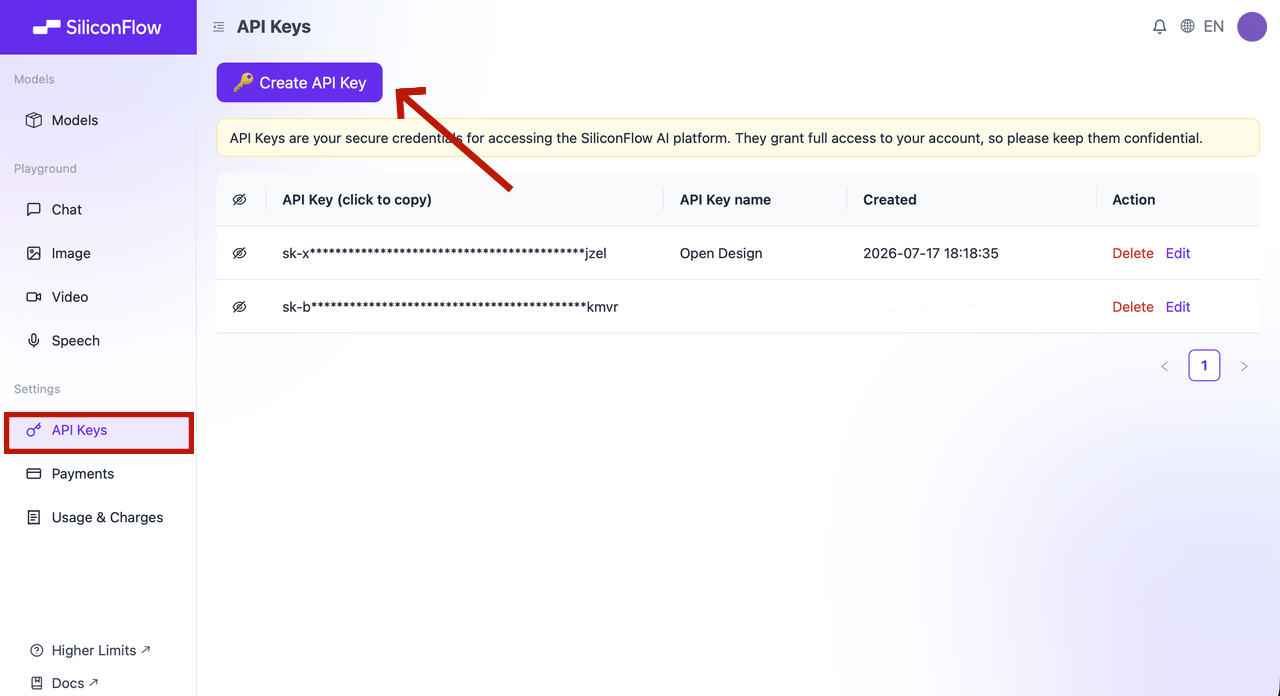
* Open `API Keys` in the dashboard.
* Click `🔑 Create API Key`, name it so you can find it later, and confirm.
* Click the key to copy it.
> 🔐 API keys are credentials. Never include a real key in a document, screenshot, repository, or chat message.
 # Step 3: Connect SiliconFlow to Open Design
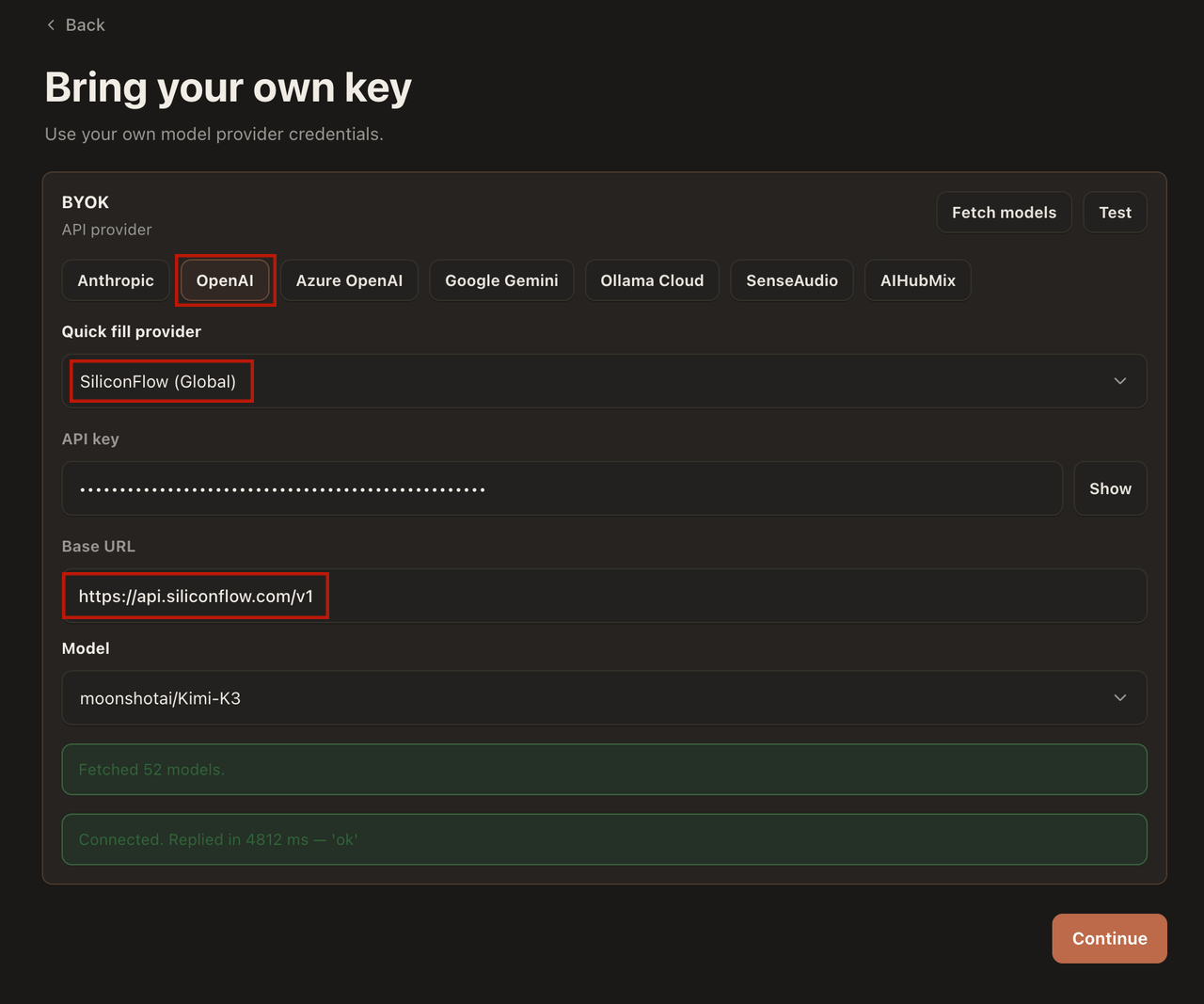
On the Open Design sign-in page, select **Local coding agent** or **Bring your own key**.
1. For **Execution mode**, choose **BYOK**.
2. For the **API provider**, choose **OpenAI**.
3. Select the **SiliconFlow Global** preset from the provider dropdown. This auto-fills the Base URL to `https://api.siliconflow.com/v1`.
4. Paste your SiliconFlow API key.
5. Choose a model: enter any model ID from the [SiliconFlow model library](https://www.siliconflow.com/models), for example `deepseek-ai/DeepSeek-V4` or `moonshotai/Kimi-K3`.
That's it — Open Design will now route all BYOK runs through SiliconFlow.
# Step 3: Connect SiliconFlow to Open Design
On the Open Design sign-in page, select **Local coding agent** or **Bring your own key**.
1. For **Execution mode**, choose **BYOK**.
2. For the **API provider**, choose **OpenAI**.
3. Select the **SiliconFlow Global** preset from the provider dropdown. This auto-fills the Base URL to `https://api.siliconflow.com/v1`.
4. Paste your SiliconFlow API key.
5. Choose a model: enter any model ID from the [SiliconFlow model library](https://www.siliconflow.com/models), for example `deepseek-ai/DeepSeek-V4` or `moonshotai/Kimi-K3`.
That's it — Open Design will now route all BYOK runs through SiliconFlow.
 # Step 4: Generate your first design
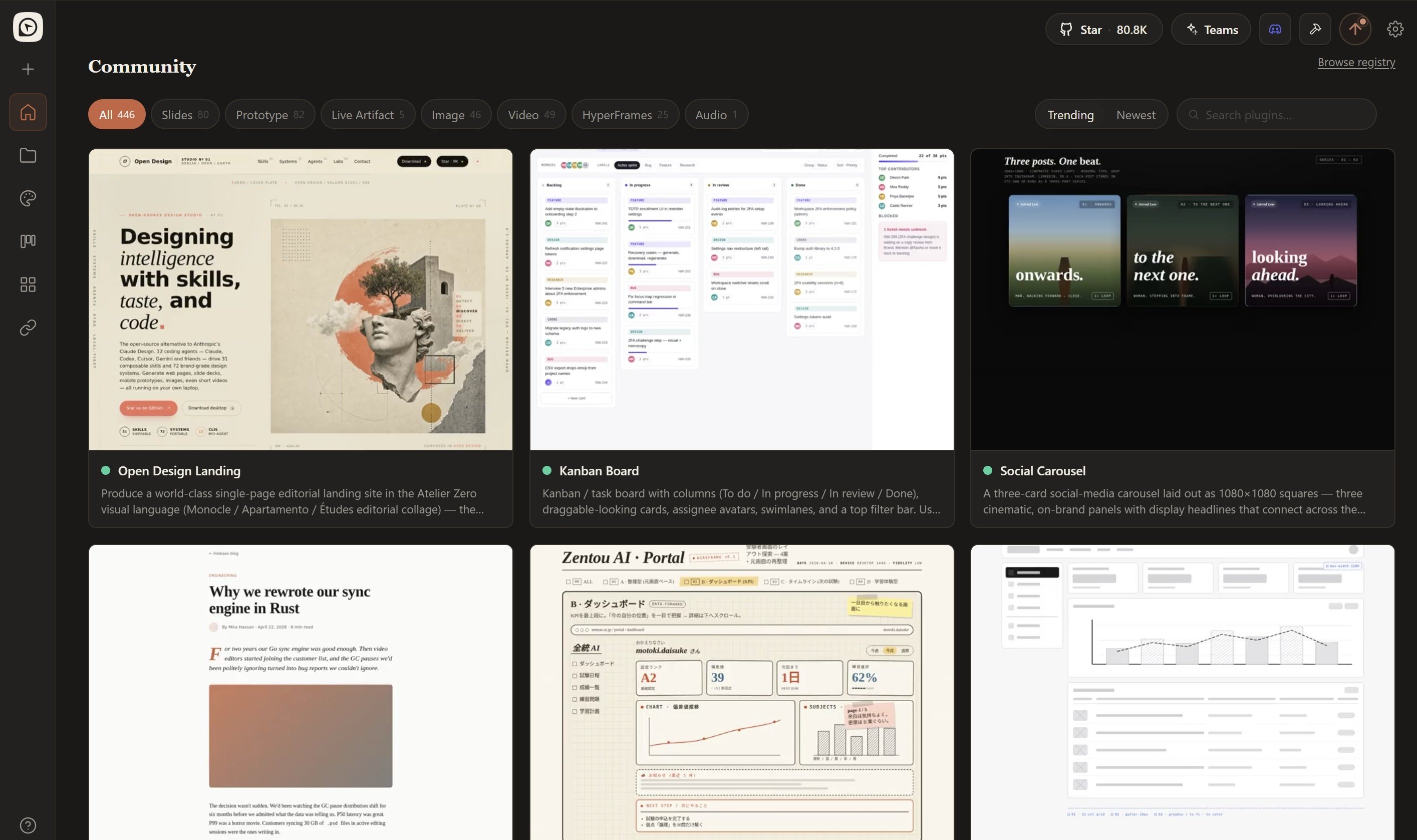
1. Head back to the **Home** page and select **New Project** or **Start Designing**.
2. Pick a skill (e.g. `canvas-design`, `ad-creative`,` twitter share card`) or a design template (e.g. `Website clone`, `Prototype`, `Live artifact`).
3. Type a brief in the chat box and hit run. For example:
```Plain theme={null}
Create a responsive sign-in page with email, password, and SSO options with Apple-style.
```
4. Open Design streams the artifact into a sandboxed preview as it generates.
5. Review the output before accepting any changes to local files.
From there you can keep going:
* **Iterate in place:** refine through follow-up prompts without starting over.
* **Export:** download as HTML, PDF, PPTX, or ZIP.
* **Hand off to code:** the artifact is real HTML/CSS, ready to drop into Cursor, Codex, or Claude Code.
# What you can build
With SiliconFlow as the model provider, Open Design's full skill catalog is at your disposal:
* **Prototypes:** landing pages, web apps, mobile screens
* **Pitch decks:** exportable to PPTX and PDF
* **Dashboards:** analytics panels, KPI views, decision rooms
* **Images & video:** branded visuals and motion graphics
Switching models is just a settings change — a lighter model for quick iterations, a stronger one for complex projects.
# Step 4: Generate your first design
1. Head back to the **Home** page and select **New Project** or **Start Designing**.
2. Pick a skill (e.g. `canvas-design`, `ad-creative`,` twitter share card`) or a design template (e.g. `Website clone`, `Prototype`, `Live artifact`).
3. Type a brief in the chat box and hit run. For example:
```Plain theme={null}
Create a responsive sign-in page with email, password, and SSO options with Apple-style.
```
4. Open Design streams the artifact into a sandboxed preview as it generates.
5. Review the output before accepting any changes to local files.
From there you can keep going:
* **Iterate in place:** refine through follow-up prompts without starting over.
* **Export:** download as HTML, PDF, PPTX, or ZIP.
* **Hand off to code:** the artifact is real HTML/CSS, ready to drop into Cursor, Codex, or Claude Code.
# What you can build
With SiliconFlow as the model provider, Open Design's full skill catalog is at your disposal:
* **Prototypes:** landing pages, web apps, mobile screens
* **Pitch decks:** exportable to PPTX and PDF
* **Dashboards:** analytics panels, KPI views, decision rooms
* **Images & video:** branded visuals and motion graphics
Switching models is just a settings change — a lighter model for quick iterations, a stronger one for complex projects.
 # Which model should you pick?
The model you choose affects both the quality of generated artifacts and generation speed. For design tasks, strong instruction-following and long-context capability matter most, because the agent needs to read a full `DESIGN.md` (often 2,000+ tokens) plus skill instructions and produce complete, production-ready artifacts.
| **Model** | **Highlights** |
| :--------------------------------------------------------------------------: | :-----------------------------------------------------------------------------------------------------------------------------------------------------------------------------------------------------: |
| [**Kimi K3**](https://www.siliconflow.com/models/kimi-k3) | Excellent frontend generation, #1 on Frontend Code Arena, native 1M context. |
| [**GLM-5.2**](https://www.siliconflow.com/models/glm-5-2) | Strong coding performance with reliable long-context UI generation. |
| [**DeepSeek V4 Series**](https://www.siliconflow.com/models/deepseek-v4-pro) | 1M context, agent-friendly, excellent value for everyday workloads. |
| [**Explore More**](https://www.siliconflow.com/models) | SiliconFlow offers 200+ models from leading AI labs, including DeepSeek, GLM, Kimi, Qwen, MiniMax, Tencent Hunyuan, LongCat, Nex-agi, and more, so you can always choose the right model for your task. |
**Ready to build?** Create a SiliconFlow API key, connect it to Open Design, and start generating production-ready designs with 200+ models in minutes.
# Resources
### Open Design
* Website: [https://open-design.ai/](https://open-design.ai/)
* GitHub: [https://github.com/nexu-io/open-design](https://github.com/nexu-io/open-design)
* Quickstart: [https://github.com/nexu-io/open-design/blob/main/QUICKSTART.md](https://github.com/nexu-io/open-design/blob/main/QUICKSTART.md)
* Discord: [https://discord.gg/mHAjSMV6gz](https://discord.gg/mHAjSMV6gz)
* X: [https://x.com/OpenDesignHQ](https://x.com/OpenDesignHQ)
### SiliconFlow
* Website: [https://siliconflow.com](https://siliconflow.com/)
* API Documentation: [https://docs.siliconflow.com](https://docs.siliconflow.com/)
* Model Library: [https://siliconflow.com/models](https://siliconflow.com/models)
* Discord: [https://discord.com/invite/7Ey3dVNFpT](https://discord.com/invite/7Ey3dVNFpT)
* X: [https://x.com/SiliconFlowAI](https://x.com/SiliconFlowAI)
# Which model should you pick?
The model you choose affects both the quality of generated artifacts and generation speed. For design tasks, strong instruction-following and long-context capability matter most, because the agent needs to read a full `DESIGN.md` (often 2,000+ tokens) plus skill instructions and produce complete, production-ready artifacts.
| **Model** | **Highlights** |
| :--------------------------------------------------------------------------: | :-----------------------------------------------------------------------------------------------------------------------------------------------------------------------------------------------------: |
| [**Kimi K3**](https://www.siliconflow.com/models/kimi-k3) | Excellent frontend generation, #1 on Frontend Code Arena, native 1M context. |
| [**GLM-5.2**](https://www.siliconflow.com/models/glm-5-2) | Strong coding performance with reliable long-context UI generation. |
| [**DeepSeek V4 Series**](https://www.siliconflow.com/models/deepseek-v4-pro) | 1M context, agent-friendly, excellent value for everyday workloads. |
| [**Explore More**](https://www.siliconflow.com/models) | SiliconFlow offers 200+ models from leading AI labs, including DeepSeek, GLM, Kimi, Qwen, MiniMax, Tencent Hunyuan, LongCat, Nex-agi, and more, so you can always choose the right model for your task. |
**Ready to build?** Create a SiliconFlow API key, connect it to Open Design, and start generating production-ready designs with 200+ models in minutes.
# Resources
### Open Design
* Website: [https://open-design.ai/](https://open-design.ai/)
* GitHub: [https://github.com/nexu-io/open-design](https://github.com/nexu-io/open-design)
* Quickstart: [https://github.com/nexu-io/open-design/blob/main/QUICKSTART.md](https://github.com/nexu-io/open-design/blob/main/QUICKSTART.md)
* Discord: [https://discord.gg/mHAjSMV6gz](https://discord.gg/mHAjSMV6gz)
* X: [https://x.com/OpenDesignHQ](https://x.com/OpenDesignHQ)
### SiliconFlow
* Website: [https://siliconflow.com](https://siliconflow.com/)
* API Documentation: [https://docs.siliconflow.com](https://docs.siliconflow.com/)
* Model Library: [https://siliconflow.com/models](https://siliconflow.com/models)
* Discord: [https://discord.com/invite/7Ey3dVNFpT](https://discord.com/invite/7Ey3dVNFpT)
* X: [https://x.com/SiliconFlowAI](https://x.com/SiliconFlowAI)