> ## Documentation Index
> Fetch the complete documentation index at: https://docs.siliconflow.com/llms.txt
> Use this file to discover all available pages before exploring further.
# How to use Continue in Vs Code with SiliconFlow APIs
[Continue](https://www.continue.dev/) is an open-source AI code assistant for [VS Code](https://code.visualstudio.com/) and [JetBrains](https://www.jetbrains.com/) that keeps you in flow while you code: Ask questions about your codebase with [Chat](https://docs.continue.dev/ide-extensions/chat/quick-start), make targeted edits without switching context with [Edit](https://docs.continue.dev/ide-extensions/edit/quick-start), get inline suggestions as you type with [Autocomplete](https://docs.continue.dev/ide-extensions/autocomplete/quick-start), and hand off complex development tasks to [Agent ](https://docs.continue.dev/ide-extensions/agent/quick-start)— all without leaving your IDE.
By integrating SiliconFlow APIs into Continue, you can get access to [200+ open-source models](https://www.siliconflow.com/models), including frontier models like [DeepSeek V4 series](https://www.siliconflow.com/models/deepseek-v4-pro), [GLM-5.1](https://www.siliconflow.com/models/glm-5-1), and [Kimi K2.6](https://www.siliconflow.com/models/kimi-k2-6) — with cache support for faster and more cost-efficient inference. All accessible through one single API key.
This guide will walk you through connecting SiliconFlow to Continue in VS Code, from [obtaining your API key](https://cloud.siliconflow.com/) to configuring chat models, setting up Tab autocomplete, and verifying everything works end-to-end.
# **Step 1: Prerequisites**
## **Get Your SiliconFlow API Key**
Before you begin, ensure you have a valid SiliconFlow account:
* Register a SiliconFlow account at [https://cloud.siliconflow.com/](https://cloud.siliconflow.com/). You can sign up with Google or GitHub.
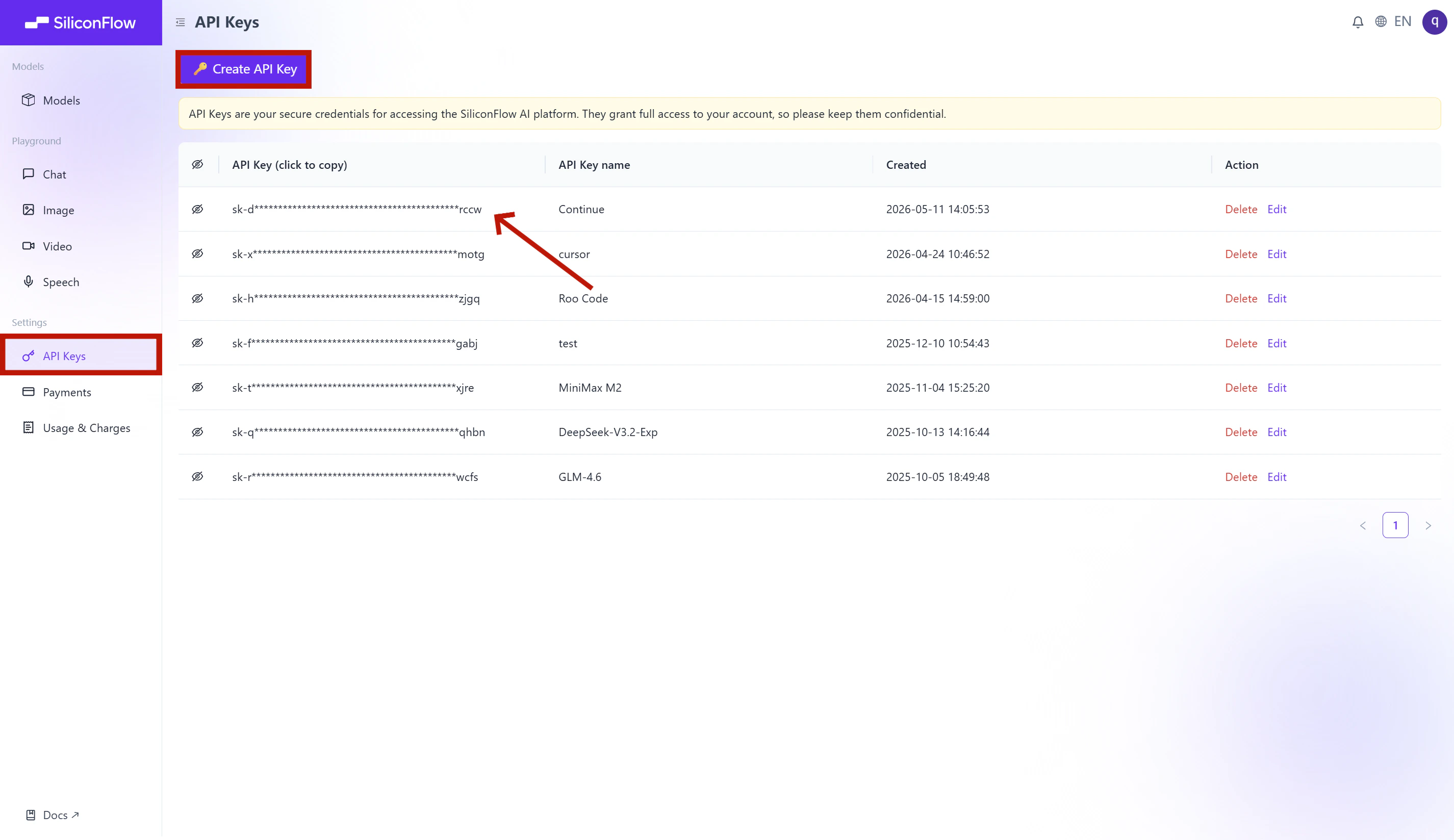
* Log in and navigate to `API Keys` in the dashboard.
* Click `🔑Create API Key `and add a name to your key to help you identify it later, then confirm to create it.
* Click the API key to copy it automatically.
⚠️ **Note:** Keep your API key secure; you will need it for the configuration in Step 3.
 # Step 2: Install Continue
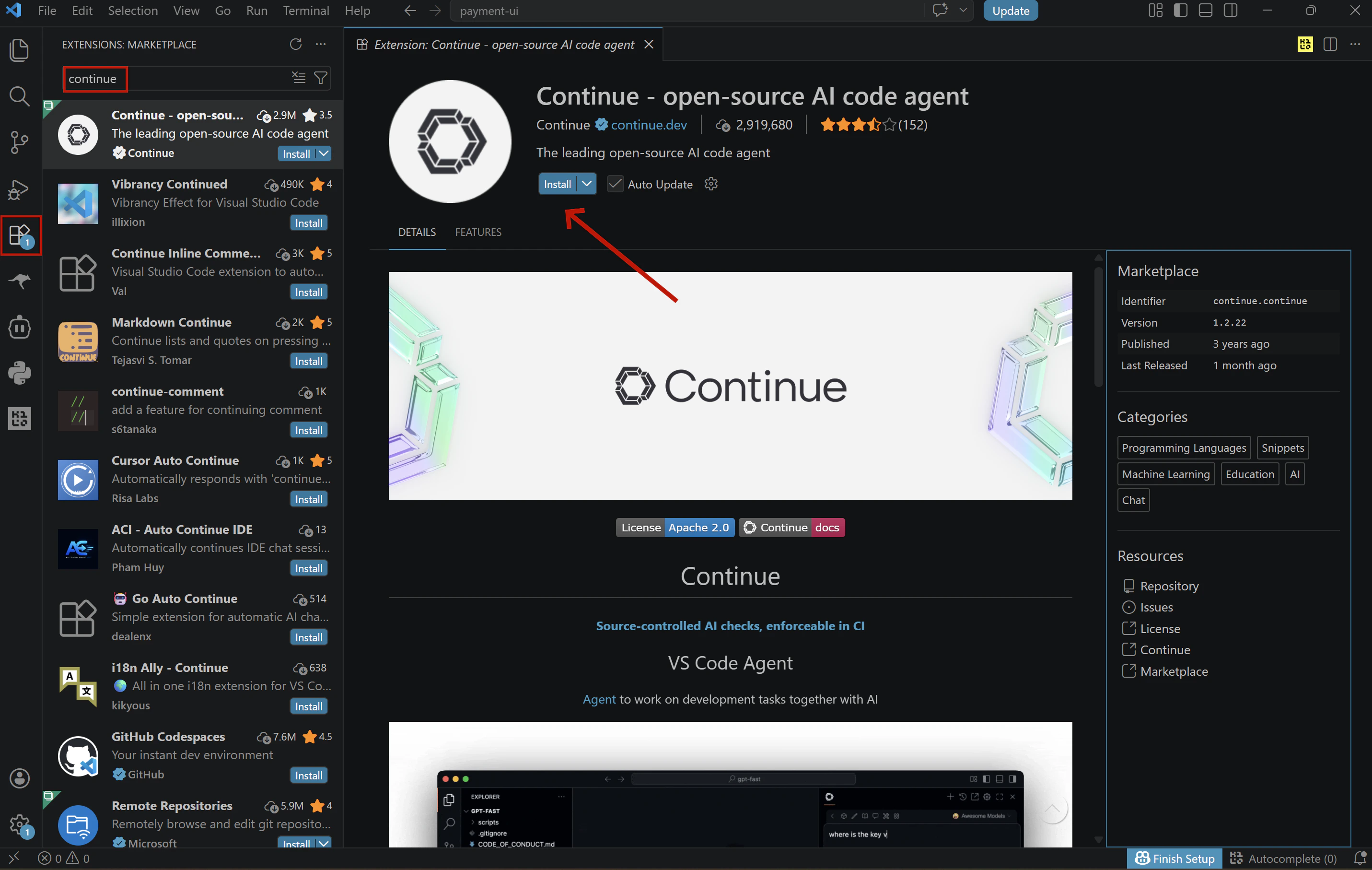
Open VS Code, click the **Extensions** icon in the left Activity Bar (`Ctrl+Shift+X` / `Cmd+Shift+X`), search for **"Continue"**, and click **Install**.
> 💡 You can also open the extension page directly from the [Visual Studio Marketplace](https://marketplace.visualstudio.com/items?itemName=Continue.continue), clicking **Install** there will redirect you to VS Code, where you'll complete the installation the same way.
# Step 2: Install Continue
Open VS Code, click the **Extensions** icon in the left Activity Bar (`Ctrl+Shift+X` / `Cmd+Shift+X`), search for **"Continue"**, and click **Install**.
> 💡 You can also open the extension page directly from the [Visual Studio Marketplace](https://marketplace.visualstudio.com/items?itemName=Continue.continue), clicking **Install** there will redirect you to VS Code, where you'll complete the installation the same way.
 # Step 3: Configure SiliconFlow APIs
Once Continue is installed, open the configuration file to set up your SiliconFlow models:
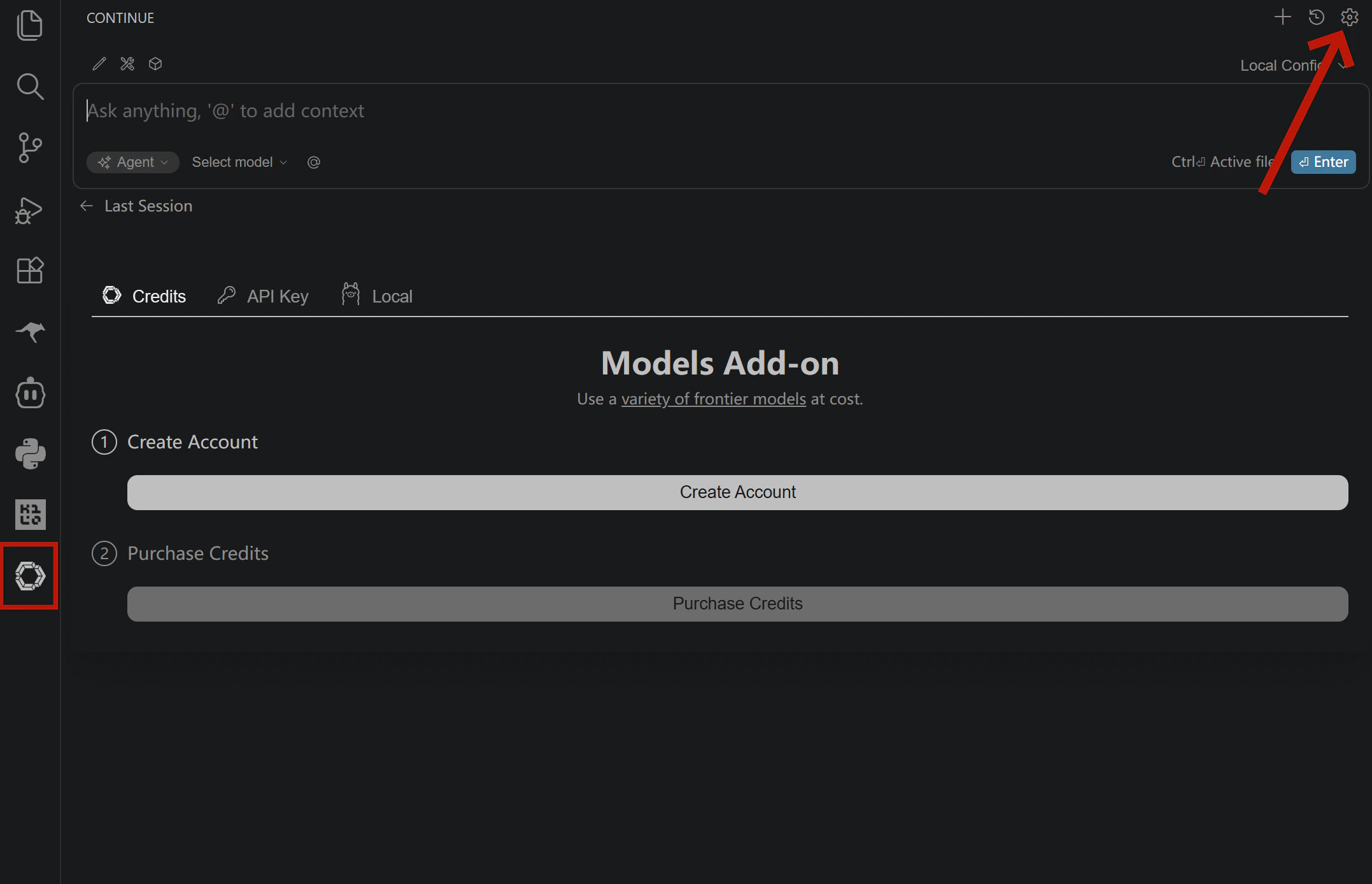
1. Click the **Continue icon** in the Activity Bar on the left
2. Click the **settings icon** in the top right corner of the Continue panel
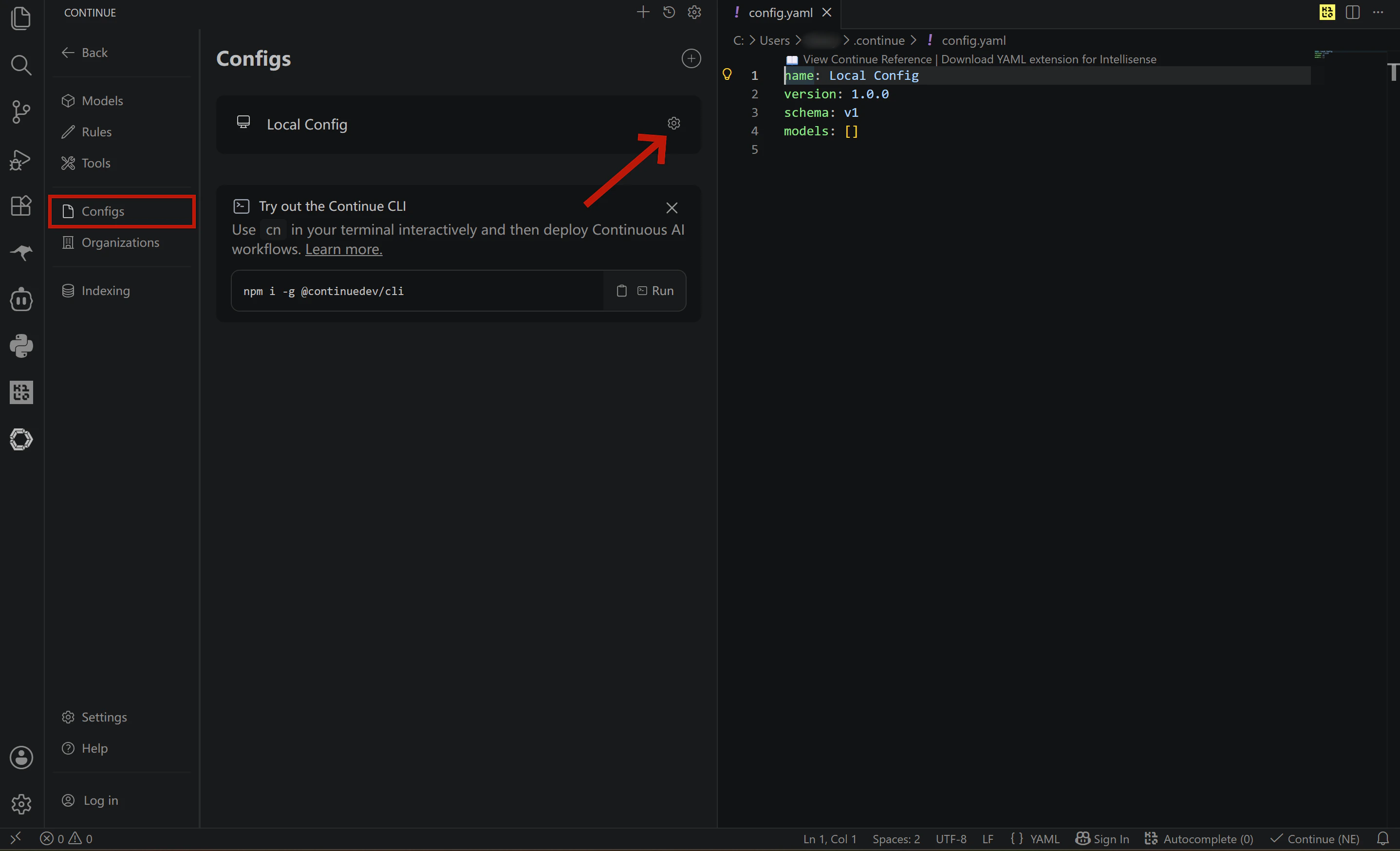
3. In the left sidebar of settings, select **Config**
4. Click the settings icon next to **Local Config** and your `config.yaml` will open automatically
# Step 3: Configure SiliconFlow APIs
Once Continue is installed, open the configuration file to set up your SiliconFlow models:
1. Click the **Continue icon** in the Activity Bar on the left
2. Click the **settings icon** in the top right corner of the Continue panel
3. In the left sidebar of settings, select **Config**
4. Click the settings icon next to **Local Config** and your `config.yaml` will open automatically
 ## Configure your chat models
Add your SiliconFlow models to the `models` list in `config.yaml`. You can configure multiple models and API keys in a single file. The example below sets up four models: `deepseek-ai/DeepSeek-V4-Flash`, `deepseek-ai/DeepSeek-V4-Pro`,` zai-org/GLM-5.1`,` moonshotai/Kimi-K2.6`.
```yaml theme={null}
name: Local Config
version: 1.0.0
schema: v1
models:
- name: deepseek-ai/DeepSeek-V4-Flash
provider: siliconflow
model: deepseek-ai/DeepSeek-V4-Flash
apiKey: "YOUR_SILICONFLOW_API_KEY"
apiBase: "https://api.siliconflow.com/v1"
- name: deepseek-ai/DeepSeek-V4-Pro
provider: siliconflow
model: deepseek-ai/DeepSeek-V4-Pro
apiKey: "YOUR_SILICONFLOW_API_KEY"
apiBase: "https://api.siliconflow.com/v1"
- name: zai-org/GLM-5.1
provider: siliconflow
model: zai-org/GLM-5.1
apiKey: "YOUR_SILICONFLOW_API_KEY"
apiBase: "https://api.siliconflow.com/v1"
- name: moonshotai/Kimi-K2.6
provider: siliconflow
model: moonshotai/Kimi-K2.6
apiKey: "YOUR_SILICONFLOW_API_KEY"
apiBase: "https://api.siliconflow.com/v1"
```
### **Not sure which model to pick?**
| **Model** | **Best for** | **Key highlights** |
| :-----------------------------------------------------------------------: | :----------------------------------------------------: | :----------------------------------------------------------------------------------: |
| [DeepSeek-V4-Flash](https://www.siliconflow.com/models/deepseek-v4-flash) | Fast, cost-effective coding chat / large codebase | 1M context · 3 reasoning modes · best value in the V4 series |
| [DeepSeek-V4-Pro](https://www.siliconflow.com/models/deepseek-v4-pro) | Complex reasoning / large codebase | 1M context · #1 open-source on math, STEM & competitive coding · approaches Opus 4.6 |
| [GLM-5.1](https://www.siliconflow.com/models/glm-5-1) | Long-horizon agentic tasks | 58.4 on SWE-Bench Pro · long-horizon execution · iterative self-improvement |
| [Kimi-K2.6](https://www.siliconflow.com/models/kimi-k2-6) | Long-horizon tasks / Frontend generation / multi-agent | Agent swarm architecture · long-horizon coding · prompt-to-frontend generation |
### Cache More, Spend Less
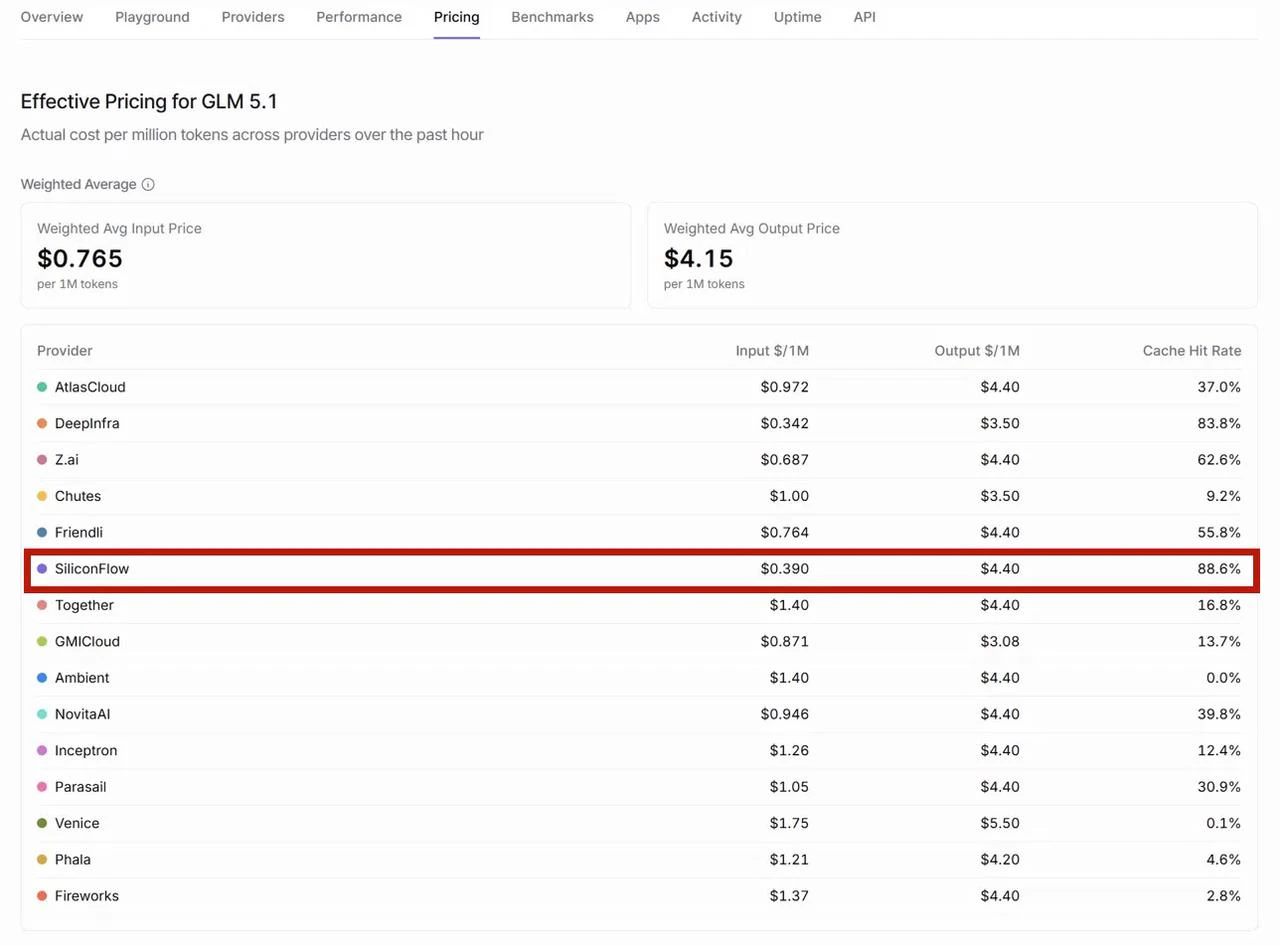
All four models above are hosted on SiliconFlow with context caching enabled. SiliconFlow consistently delivers high cache hit rates across models — for example, according to [OpenRouter](https://openrouter.ai/)'s provider performance data, SiliconFlow achieves the highest cache hit rate among all GLM-5.1 providers at **88.6%**, significantly ahead of the competition. For you as a developer, this translates directly to faster response times and lower inference costs on repeated contexts.
Looking for more models? Browse the full model library at [SiliconFlow Models](https://siliconflow.com/models) or stay up to date with the latest releases on the [SiliconFlow Blog](https://siliconflow.com/blog).
## Configure your chat models
Add your SiliconFlow models to the `models` list in `config.yaml`. You can configure multiple models and API keys in a single file. The example below sets up four models: `deepseek-ai/DeepSeek-V4-Flash`, `deepseek-ai/DeepSeek-V4-Pro`,` zai-org/GLM-5.1`,` moonshotai/Kimi-K2.6`.
```yaml theme={null}
name: Local Config
version: 1.0.0
schema: v1
models:
- name: deepseek-ai/DeepSeek-V4-Flash
provider: siliconflow
model: deepseek-ai/DeepSeek-V4-Flash
apiKey: "YOUR_SILICONFLOW_API_KEY"
apiBase: "https://api.siliconflow.com/v1"
- name: deepseek-ai/DeepSeek-V4-Pro
provider: siliconflow
model: deepseek-ai/DeepSeek-V4-Pro
apiKey: "YOUR_SILICONFLOW_API_KEY"
apiBase: "https://api.siliconflow.com/v1"
- name: zai-org/GLM-5.1
provider: siliconflow
model: zai-org/GLM-5.1
apiKey: "YOUR_SILICONFLOW_API_KEY"
apiBase: "https://api.siliconflow.com/v1"
- name: moonshotai/Kimi-K2.6
provider: siliconflow
model: moonshotai/Kimi-K2.6
apiKey: "YOUR_SILICONFLOW_API_KEY"
apiBase: "https://api.siliconflow.com/v1"
```
### **Not sure which model to pick?**
| **Model** | **Best for** | **Key highlights** |
| :-----------------------------------------------------------------------: | :----------------------------------------------------: | :----------------------------------------------------------------------------------: |
| [DeepSeek-V4-Flash](https://www.siliconflow.com/models/deepseek-v4-flash) | Fast, cost-effective coding chat / large codebase | 1M context · 3 reasoning modes · best value in the V4 series |
| [DeepSeek-V4-Pro](https://www.siliconflow.com/models/deepseek-v4-pro) | Complex reasoning / large codebase | 1M context · #1 open-source on math, STEM & competitive coding · approaches Opus 4.6 |
| [GLM-5.1](https://www.siliconflow.com/models/glm-5-1) | Long-horizon agentic tasks | 58.4 on SWE-Bench Pro · long-horizon execution · iterative self-improvement |
| [Kimi-K2.6](https://www.siliconflow.com/models/kimi-k2-6) | Long-horizon tasks / Frontend generation / multi-agent | Agent swarm architecture · long-horizon coding · prompt-to-frontend generation |
### Cache More, Spend Less
All four models above are hosted on SiliconFlow with context caching enabled. SiliconFlow consistently delivers high cache hit rates across models — for example, according to [OpenRouter](https://openrouter.ai/)'s provider performance data, SiliconFlow achieves the highest cache hit rate among all GLM-5.1 providers at **88.6%**, significantly ahead of the competition. For you as a developer, this translates directly to faster response times and lower inference costs on repeated contexts.
Looking for more models? Browse the full model library at [SiliconFlow Models](https://siliconflow.com/models) or stay up to date with the latest releases on the [SiliconFlow Blog](https://siliconflow.com/blog).
 ## Configure Tab Autocomplete
To enable GitHub Copilot-style Tab completion, add the autocomplete model to your `models` list with `roles: - autocomplete`.
We recommend `Qwen/Qwen3-Coder-30B-A3B-Instruct` for its fast response time — as a MoE model that activates only 3B parameters per token, it delivers low-latency completions without sacrificing code quality.
```yaml theme={null}
- name: Qwen/Qwen3-Coder-30B-A3B-Instruct
provider: openai
model: Qwen/Qwen3-Coder-30B-A3B-Instruct
apiKey: "YOUR_SILICONFLOW_API_KEY"
apiBase: "https://api.siliconflow.com/v1"
roles:
- autocomplete
autocompleteOptions:
debounceDelay: 250
maxPromptTokens: 1024
```
> **Note:** Avoid using large thinking-mode models for autocomplete — they generate more slowly and are not suited for real-time completion scenarios.
## Complete config.yaml Example
To get started quickly, replace your existing `config.yaml` with the full template below.
> **Note:** Replace all instances of `YOUR_SILICONFLOW_API_KEY` with your actual API key before saving.
```yaml theme={null}
name: Local Config
version: 1.0.0
schema: v1
models:
- name: deepseek-ai/DeepSeek-V4-Flash
provider: siliconflow
model: deepseek-ai/DeepSeek-V4-Flash
apiKey: "YOUR_SILICONFLOW_API_KEY"
apiBase: "https://api.siliconflow.com/v1"
- name: deepseek-ai/DeepSeek-V4-Pro
provider: siliconflow
model: deepseek-ai/DeepSeek-V4-Pro
apiKey: "YOUR_SILICONFLOW_API_KEY"
apiBase: "https://api.siliconflow.com/v1"
- name: zai-org/GLM-5.1
provider: siliconflow
model: zai-org/GLM-5.1
apiKey: "YOUR_SILICONFLOW_API_KEY"
apiBase: "https://api.siliconflow.com/v1"
- name: moonshotai/Kimi-K2.6
provider: siliconflow
model: moonshotai/Kimi-K2.6
apiKey: "YOUR_SILICONFLOW_API_KEY"
apiBase: "https://api.siliconflow.com/v1"
- name: Qwen/Qwen3-Coder-30B-A3B-Instruct
provider: openai
model: Qwen/Qwen3-Coder-30B-A3B-Instruct
apiKey: "YOUR_SILICONFLOW_API_KEY"
apiBase: "https://api.siliconflow.com/v1"
roles:
- autocomplete
autocompleteOptions:
debounceDelay: 250
maxPromptTokens: 1024
```
# Step 4: Verify Your Setup
1. **Save and reload**
Save `config.yaml`. Continue reloads configuration automatically in most cases. If changes don't take effect, restart your IDE.
2. **Test chat**
Open the Continue chat panel. All models defined in your config will appear in the model selector — pick any one, send a test message such as `"Hello"`, and confirm you receive a response.
3. **Test autocomplete**
Open any code file (e.g., a Python file), type a snippet like`def quick_sort(arr):`, and pause for a moment. If a grey inline suggestion appears after your cursor, Tab autocomplete is working correctly.
# **Already Using OpenRouter?**
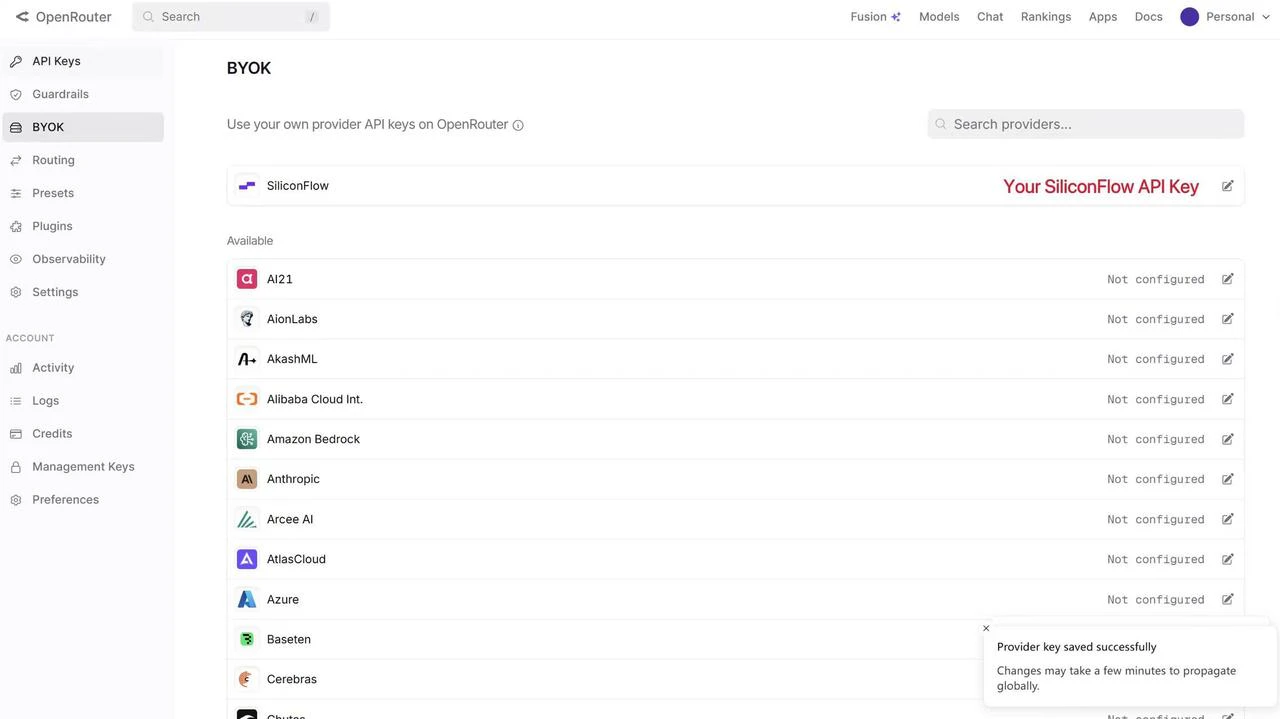
If you already have an OpenRouter account, you can connect your SiliconFlow API key via BYOK.
Once connected:
* Requests draw from your SiliconFlow balance first
* Billing and rate limits stay in your SiliconFlow account
* OpenRouter's fallback routing still works to improve reliability
**Bonus:** OpenRouter waives platform fees on your first 1M BYOK requests per month.
## Configure Tab Autocomplete
To enable GitHub Copilot-style Tab completion, add the autocomplete model to your `models` list with `roles: - autocomplete`.
We recommend `Qwen/Qwen3-Coder-30B-A3B-Instruct` for its fast response time — as a MoE model that activates only 3B parameters per token, it delivers low-latency completions without sacrificing code quality.
```yaml theme={null}
- name: Qwen/Qwen3-Coder-30B-A3B-Instruct
provider: openai
model: Qwen/Qwen3-Coder-30B-A3B-Instruct
apiKey: "YOUR_SILICONFLOW_API_KEY"
apiBase: "https://api.siliconflow.com/v1"
roles:
- autocomplete
autocompleteOptions:
debounceDelay: 250
maxPromptTokens: 1024
```
> **Note:** Avoid using large thinking-mode models for autocomplete — they generate more slowly and are not suited for real-time completion scenarios.
## Complete config.yaml Example
To get started quickly, replace your existing `config.yaml` with the full template below.
> **Note:** Replace all instances of `YOUR_SILICONFLOW_API_KEY` with your actual API key before saving.
```yaml theme={null}
name: Local Config
version: 1.0.0
schema: v1
models:
- name: deepseek-ai/DeepSeek-V4-Flash
provider: siliconflow
model: deepseek-ai/DeepSeek-V4-Flash
apiKey: "YOUR_SILICONFLOW_API_KEY"
apiBase: "https://api.siliconflow.com/v1"
- name: deepseek-ai/DeepSeek-V4-Pro
provider: siliconflow
model: deepseek-ai/DeepSeek-V4-Pro
apiKey: "YOUR_SILICONFLOW_API_KEY"
apiBase: "https://api.siliconflow.com/v1"
- name: zai-org/GLM-5.1
provider: siliconflow
model: zai-org/GLM-5.1
apiKey: "YOUR_SILICONFLOW_API_KEY"
apiBase: "https://api.siliconflow.com/v1"
- name: moonshotai/Kimi-K2.6
provider: siliconflow
model: moonshotai/Kimi-K2.6
apiKey: "YOUR_SILICONFLOW_API_KEY"
apiBase: "https://api.siliconflow.com/v1"
- name: Qwen/Qwen3-Coder-30B-A3B-Instruct
provider: openai
model: Qwen/Qwen3-Coder-30B-A3B-Instruct
apiKey: "YOUR_SILICONFLOW_API_KEY"
apiBase: "https://api.siliconflow.com/v1"
roles:
- autocomplete
autocompleteOptions:
debounceDelay: 250
maxPromptTokens: 1024
```
# Step 4: Verify Your Setup
1. **Save and reload**
Save `config.yaml`. Continue reloads configuration automatically in most cases. If changes don't take effect, restart your IDE.
2. **Test chat**
Open the Continue chat panel. All models defined in your config will appear in the model selector — pick any one, send a test message such as `"Hello"`, and confirm you receive a response.
3. **Test autocomplete**
Open any code file (e.g., a Python file), type a snippet like`def quick_sort(arr):`, and pause for a moment. If a grey inline suggestion appears after your cursor, Tab autocomplete is working correctly.
# **Already Using OpenRouter?**
If you already have an OpenRouter account, you can connect your SiliconFlow API key via BYOK.
Once connected:
* Requests draw from your SiliconFlow balance first
* Billing and rate limits stay in your SiliconFlow account
* OpenRouter's fallback routing still works to improve reliability
**Bonus:** OpenRouter waives platform fees on your first 1M BYOK requests per month.
 To set it up in Continue with OpenRouter API Keys:
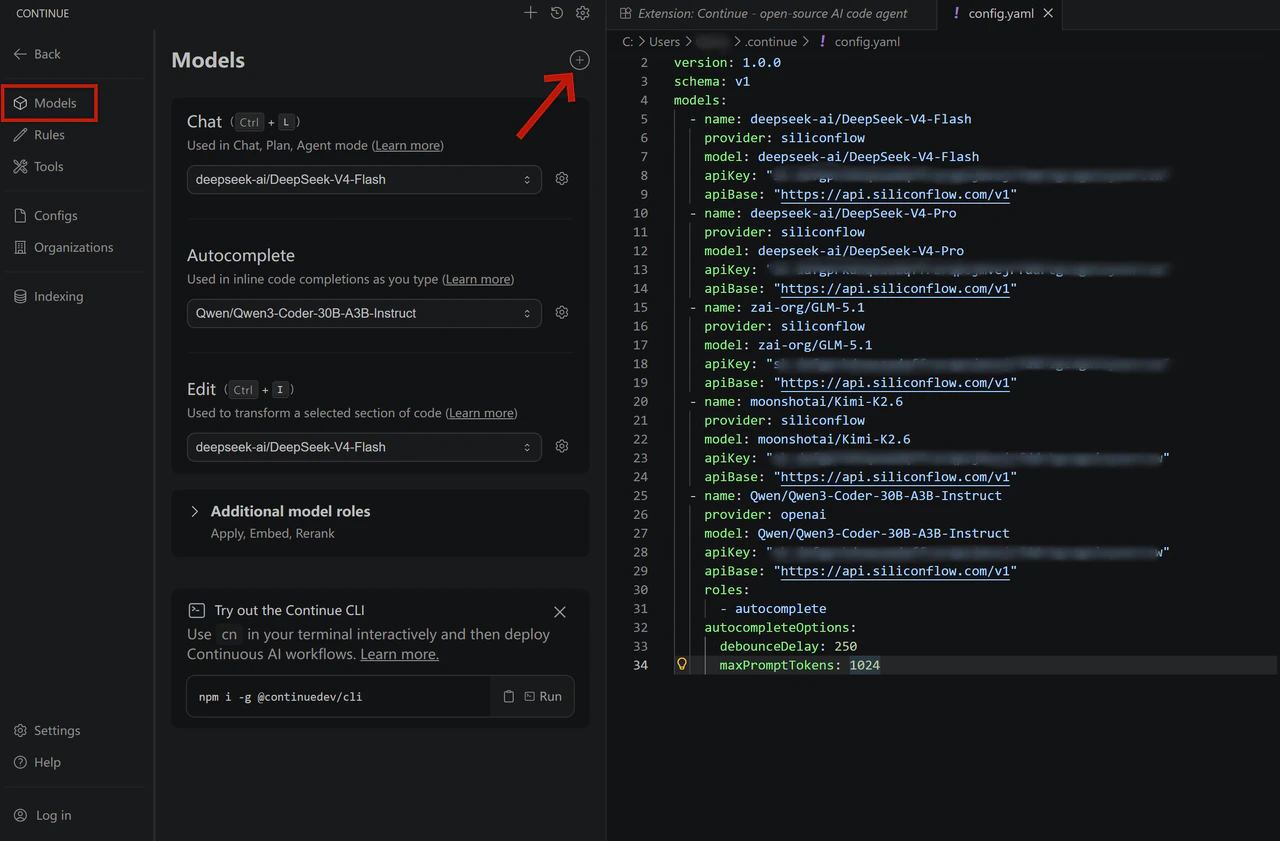
1. Open the Continue panel and click the **settings icon** in the top right corner
2. In the left sidebar, select **Models**
3. Click the `+` icon next to Models
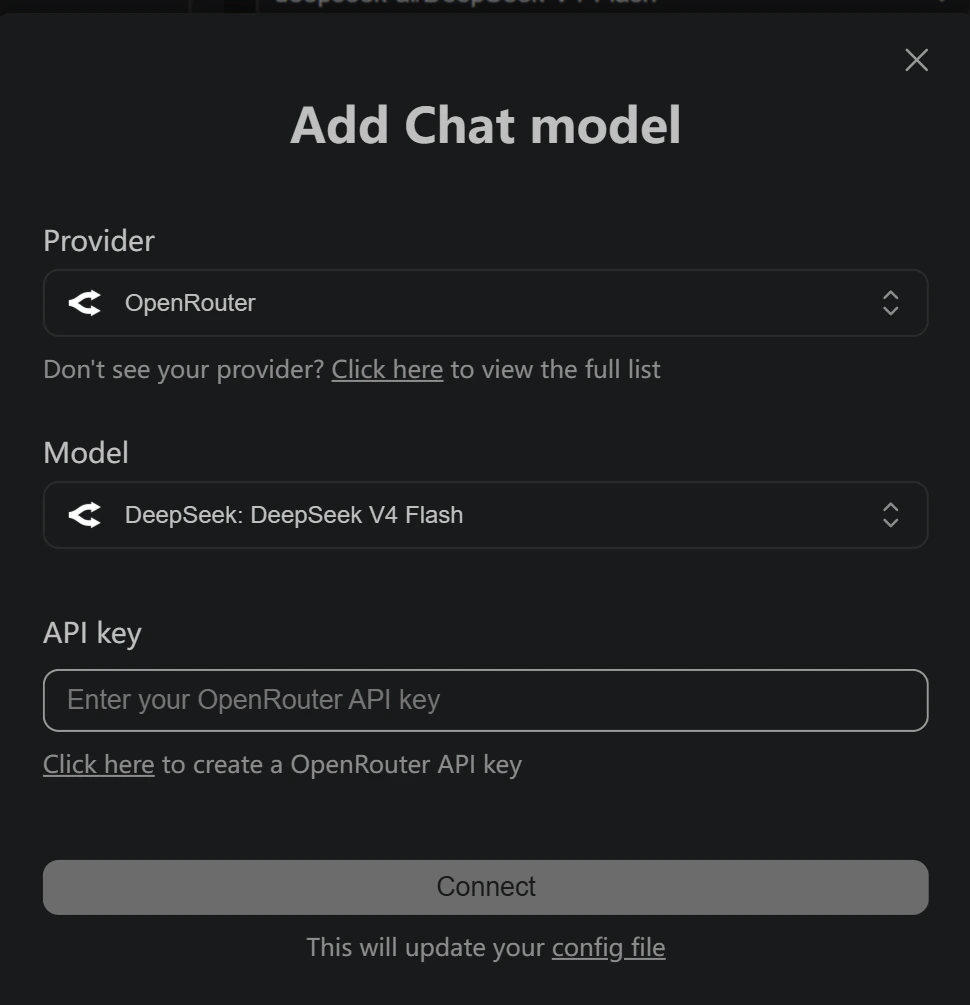
4. Select **OpenRouter** as the provider
5. Choose your desired model and enter your **OpenRouter API key**
To set it up in Continue with OpenRouter API Keys:
1. Open the Continue panel and click the **settings icon** in the top right corner
2. In the left sidebar, select **Models**
3. Click the `+` icon next to Models
4. Select **OpenRouter** as the provider
5. Choose your desired model and enter your **OpenRouter API key**
 # Resources
### **Continue**
* Website: [https://continue.dev/](https://continue.dev/)
* Docs: [https://docs.continue.dev/](https://docs.continue.dev/)
* Github: [https://github.com/continuedev/continue](https://github.com/continuedev/continue)
### OpenRouter
* BYOK Setting: [https://openrouter.ai/workspaces/default/byok](https://openrouter.ai/workspaces/default/byok)
* SiliconFlow on OpenRouter: [https://openrouter.ai/provider/siliconflow](https://openrouter.ai/provider/siliconflow)
### **SiliconFlow**
* Website: [https://siliconflow.com](https://siliconflow.com)
* API Documentation: [https://docs.siliconflow.com](https://docs.siliconflow.com)
* Model Library: [https://siliconflow.com/models](https://siliconflow.com/models)
* Discord: [https://discord.com/invite/7Ey3dVNFpT](https://discord.com/invite/7Ey3dVNFpT)
* X: [https://x.com/SiliconFlowAI](https://x.com/SiliconFlowAI)
# Resources
### **Continue**
* Website: [https://continue.dev/](https://continue.dev/)
* Docs: [https://docs.continue.dev/](https://docs.continue.dev/)
* Github: [https://github.com/continuedev/continue](https://github.com/continuedev/continue)
### OpenRouter
* BYOK Setting: [https://openrouter.ai/workspaces/default/byok](https://openrouter.ai/workspaces/default/byok)
* SiliconFlow on OpenRouter: [https://openrouter.ai/provider/siliconflow](https://openrouter.ai/provider/siliconflow)
### **SiliconFlow**
* Website: [https://siliconflow.com](https://siliconflow.com)
* API Documentation: [https://docs.siliconflow.com](https://docs.siliconflow.com)
* Model Library: [https://siliconflow.com/models](https://siliconflow.com/models)
* Discord: [https://discord.com/invite/7Ey3dVNFpT](https://discord.com/invite/7Ey3dVNFpT)
* X: [https://x.com/SiliconFlowAI](https://x.com/SiliconFlowAI)