> ## Documentation Index
> Fetch the complete documentation index at: https://docs.siliconflow.com/llms.txt
> Use this file to discover all available pages before exploring further.
# 使用问题
## 1. 如何注销账号
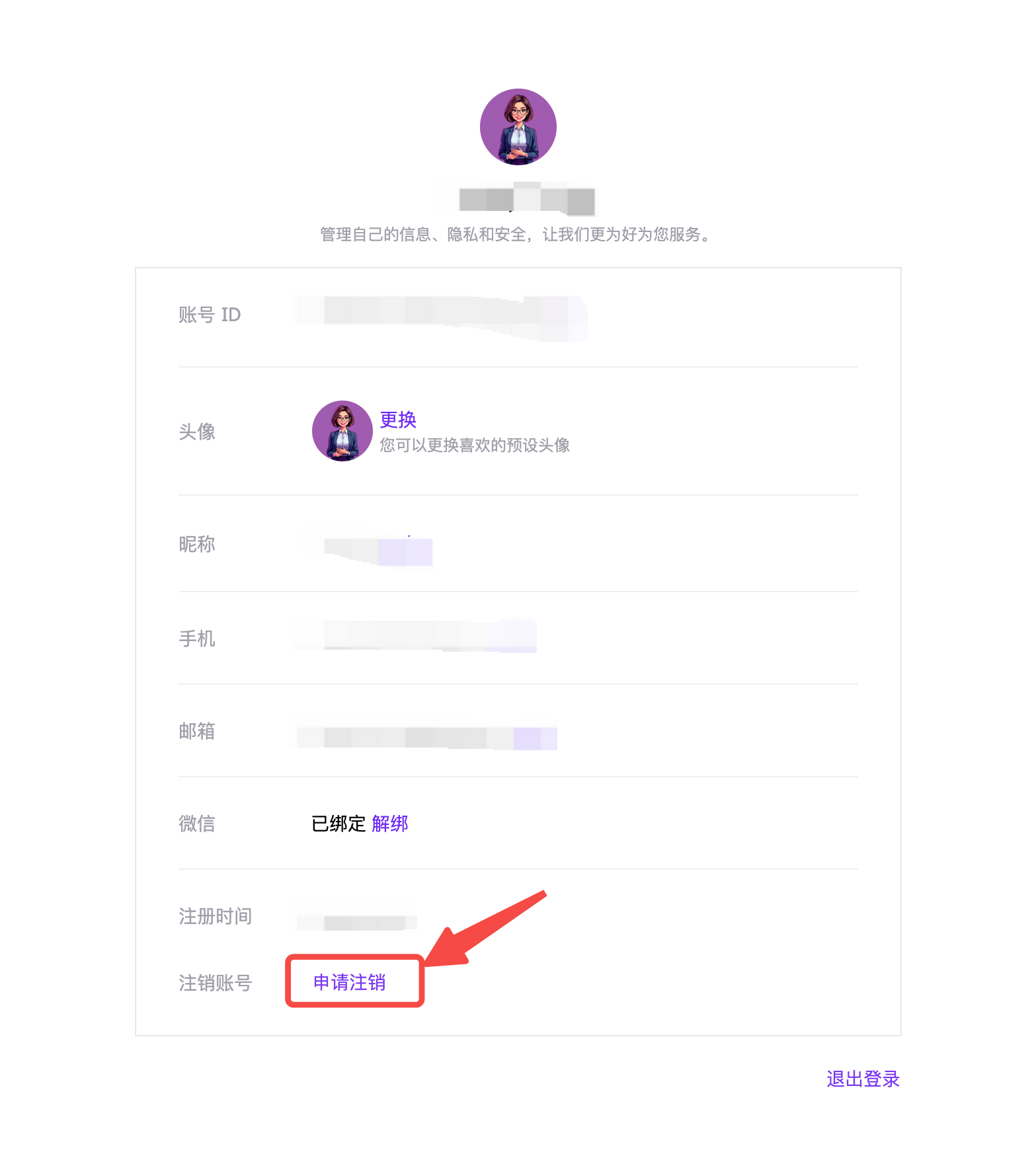
请进入[个人中心](https://account.siliconflow.cn/zh/user/settings)页面,点击“申请注销”,填写注销账号申请。核实后将在 15 个工作日内处理。
 ## 2. 如何邀请
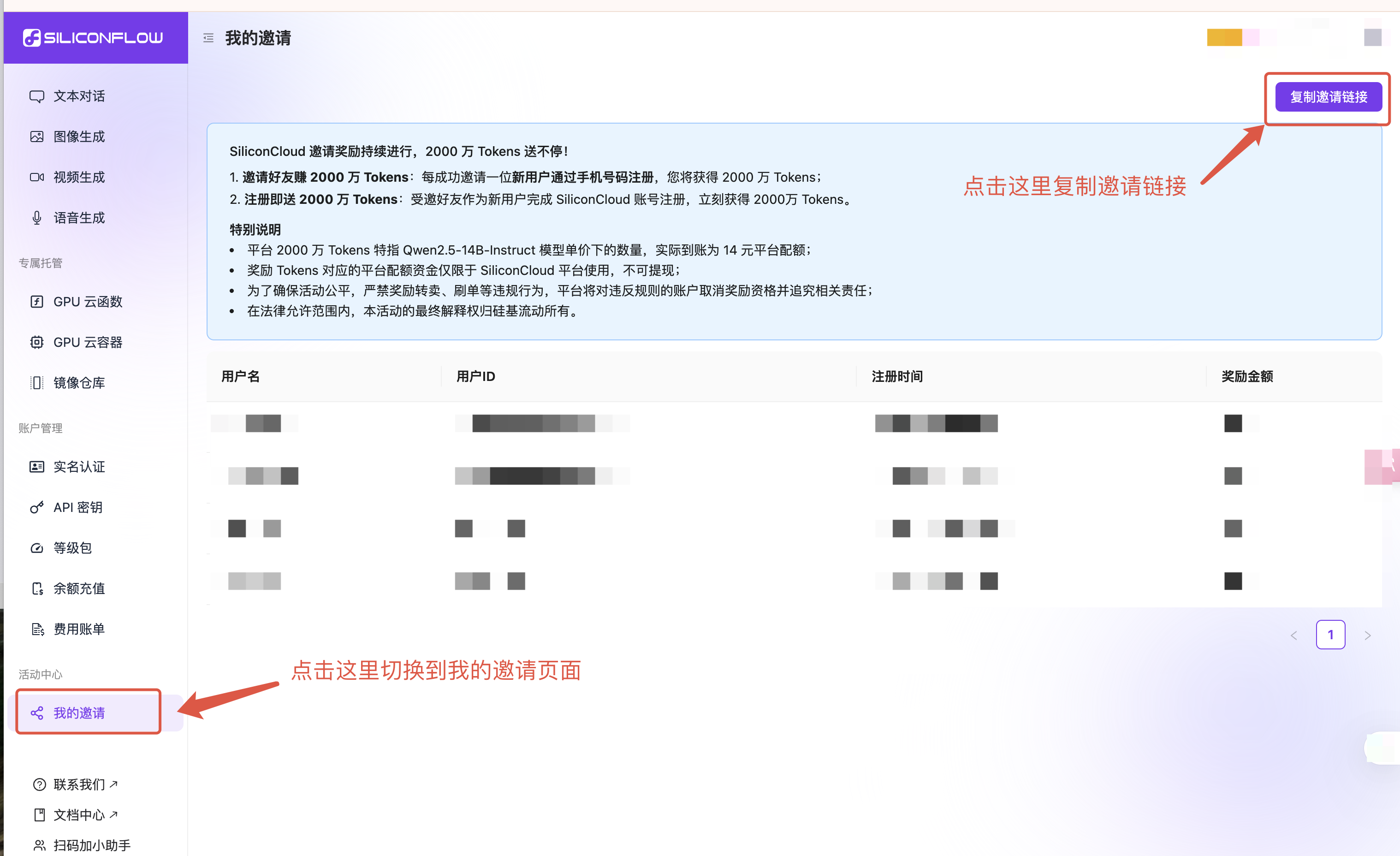
1. 电脑端登录 [SiliconFlow](https://cloud.siliconflow.com/) 官网。
2. 点击左侧边栏“[我的邀请](https://cloud.siliconflow.com/invitation)” — “复制邀请链接”。
3. 分享邀请信息。
4. 邀请成功的具体信息会显示在“[我的邀请](https://cloud.siliconflow.com/invitation)”页面。
有三种邀请方式供选择:二维码、邀请码和邀请链接。
## 2. 如何邀请
1. 电脑端登录 [SiliconFlow](https://cloud.siliconflow.com/) 官网。
2. 点击左侧边栏“[我的邀请](https://cloud.siliconflow.com/invitation)” — “复制邀请链接”。
3. 分享邀请信息。
4. 邀请成功的具体信息会显示在“[我的邀请](https://cloud.siliconflow.com/invitation)”页面。
有三种邀请方式供选择:二维码、邀请码和邀请链接。
 ## 3. 为什么我的手机号无法注册或绑定?
为保障平台用户的账户安全与服务体验,平台对部分可能存在安全风险的手机号号段(如部分虚拟运营商号段)做了注册与绑定限制。此举旨在为您提供更加安全、稳定的服务环境,降低因恶意行为对正常使用可能带来的干扰和影响。
建议您使用中国大陆常见运营商(如中国移动、中国联通、中国电信)所提供的常规手机号进行注册或绑定操作。
如您使用的是正规手机号但仍出现提示,可添加小助手微信,我们将及时协助您解决。
## 3. 为什么我的手机号无法注册或绑定?
为保障平台用户的账户安全与服务体验,平台对部分可能存在安全风险的手机号号段(如部分虚拟运营商号段)做了注册与绑定限制。此举旨在为您提供更加安全、稳定的服务环境,降低因恶意行为对正常使用可能带来的干扰和影响。
建议您使用中国大陆常见运营商(如中国移动、中国联通、中国电信)所提供的常规手机号进行注册或绑定操作。
如您使用的是正规手机号但仍出现提示,可添加小助手微信,我们将及时协助您解决。
 ## 4. 为什么无法进行 Google / GitHub 关联登录了?
为了提升账户安全性,硅基流动中文站已于近期下线 Google / GitHub 的关联登录功能。
如您已绑定手机号,仍可通过手机登录;或使用“邮箱登录”功能,输入您的 Google / GitHub 邮箱地址接收验证码完成登录。
如遇其他问题,请点击 [硅基流动 MaaS 线上需求收集表](https://m09tqret04o.feishu.cn/share/base/form/shrcnaamvQ4C7YKMixVnS32k1G3) 反馈。
## 4. 为什么无法进行 Google / GitHub 关联登录了?
为了提升账户安全性,硅基流动中文站已于近期下线 Google / GitHub 的关联登录功能。
如您已绑定手机号,仍可通过手机登录;或使用“邮箱登录”功能,输入您的 Google / GitHub 邮箱地址接收验证码完成登录。
如遇其他问题,请点击 [硅基流动 MaaS 线上需求收集表](https://m09tqret04o.feishu.cn/share/base/form/shrcnaamvQ4C7YKMixVnS32k1G3) 反馈。